
In the rapidly evolving world of digital finance, Peer-to-Peer (P2P) trading has emerged as the most popular way for global users to enter the cryptocurrency market. Unlike traditional exchanges where you buy directly from a platform, P2P allows you to buy Tether (USDT) directly from other individuals using your local currency and preferred payment methods.
However, with the freedom of P2P comes the responsibility of security. In 2026, scammers have become more sophisticated, using fake screenshots and social engineering to target unsuspecting buyers. In this guide, we will provide a comprehensive, step-by-step walkthrough on how to buy USDT using Binance P2P safely, ensuring your funds are protected by Binance’s escrow service every step of the way.
read more https://zebialerts.com/create-verify-binance-account-global-guide/
What is Binance P2P and How Does it Work?
Binance P2P (Peer-to-Peer) is a decentralized marketplace within the Binance ecosystem. Think of it as the “eBay” of crypto.
The core of its security is the Escrow Service.2 When you start a trade to buy USDT, Binance “locks” the seller’s cryptocurrency in a digital safe (escrow).3 The seller cannot withdraw this crypto until they confirm they have received your payment.4 This ensures that as long as you provide proof of payment and follow the rules, you are guaranteed to receive your assets.+2
Step 1: Preparing Your Account for P2P Trading
Before you can access the P2P marketplace, your account must meet global compliance standards.5
- Identity Verification (KYC): Ensure your account is fully verified. Unverified accounts are restricted from P2P to prevent money laundering.
- Enable 2FA: Activate Google Authenticator or SMS authentication. This adds a critical layer of security to your transactions.
- Add Payment Methods: Go to your P2P profile and add your bank account or e-wallet details. Crucial: The name on your bank account must match your verified name on Binance exactly.
Step 2: Navigating the P2P Interface
Once logged into the Binance App or website:
- Go to the “Trade” tab and select “P2P.”
- Select the “Buy” tab at the top.
- Choose “USDT” as the asset.
- Select your Local Currency (e.g., USD, EUR, GBP) from the dropdown menu.
- Filter by Payment Method (e.g., Bank Transfer, Revolut, Wise) to find compatible sellers.6
Step 3: How to Choose a Safe Seller
Selecting the right trading partner is 90% of the safety battle. Do not just look for the lowest price; look for the most reliable merchant.
Quick Reference: Safe P2P Buying Checklist
| Phase | Critical Step | Expert Safety Instructions |
| Preparation | Compliance First | Verified Account Required: You must complete KYC (Identity Verification) and enable 2FA (Two-Factor Authentication) before accessing the P2P marketplace. |
| Preparation | Payment Matching | Crucial Rule: Your bank account or e-wallet name must match your Binance verified name exactly to avoid frozen trades or account bans. |
| Selection | Merchant Vetting | Trust Metrics: Look for the Yellow Diamond/Shield badge (Verified Merchants). Prioritize sellers with a 95%+ completion rate and over 500+ recent trades. |
| Transaction | In-App Chat Only | Stay on Platform: Never communicate via WhatsApp or Telegram. Binance support can only intervene if your chat history is on their internal system. |
| Payment | Safe References | No Crypto Terms: When making your bank transfer, do not use words like “Binance,” “Crypto,” or “USDT” in the memo/reference. Use neutral terms like “Personal” or “Services.” |
| Release | The Escrow Rule | Buyer Security: Once you start the trade, Binance locks the seller’s USDT in an escrow vault. The seller cannot access it until they release it to you or a dispute is settled. |
| Release | Proof of Payment | Notify Seller: Click “Transferred, Notify Seller” ONLY after the money has left your account. Keep a screenshot of your successful bank transfer receipt. |
| Dispute | Appeal System | Don’t Panic: If the seller doesn’t release the crypto within 15–30 minutes, use the “Appeal” button. Support will manually release the assets once you provide proof. |
The “Verified Merchant” Badge
Look for a yellow diamond or a shield icon next to the seller’s name. These are “Verified Merchants” or “Shield Merchants” who have undergone additional vetting by Binance and often have a security deposit on the platform.7
Completion Rate and Trade Volume
- Completion Rate: Aim for sellers with a rate of 95% or higher.8 This means they rarely cancel orders.
- Trade Volume: Look for sellers who have completed at least 500+ trades in the last 30 days. This indicates they are professional and active.
Step 4: Initiating the Trade
- Enter the Amount: Click “Buy” next to your chosen seller. Enter how much local currency you want to spend.
- Read the Terms: Sellers often include specific “Terms and Conditions” (e.g., “No third-party payments,” “Write ‘Personal Transfer’ in reference”). If you cannot follow their terms, do not open the trade.
- Open the Order: Click “Buy USDT.” The seller’s USDT is now locked in Binance’s escrow.9
Step 5: Making the Payment Safely
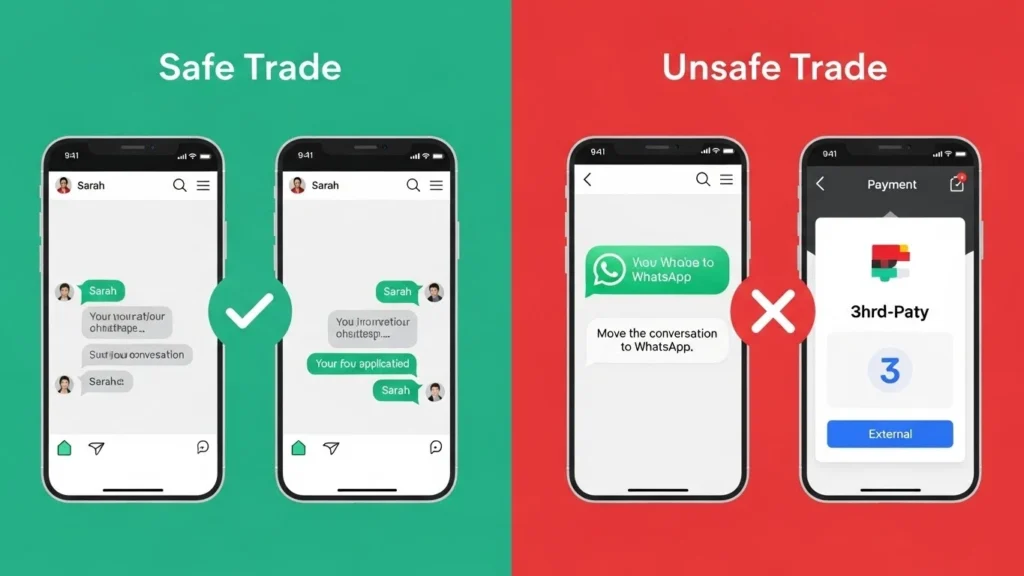
This is the most sensitive part of the process. Follow these rules strictly:
- Use the Internal Chat: Only communicate through the Binance P2P chat box.10 Never move the conversation to WhatsApp or Telegram.
- Verify the Name: Before sending money, check that the bank account name provided by the seller matches their verified name on Binance.11 If they ask you to pay a “friend’s account,” cancel the trade immediately.
- Transfer the Funds: Log into your banking app and make the transfer.
- Do Not Mention Crypto: In the payment reference/memo, never write “Crypto,” “Binance,” or “USDT.” Banks may flag or freeze transactions related to digital assets. Use “Personal” or “Services” instead.
Step 6: Marking as “Transferred”
After you have successfully sent the money:
- Go back to the Binance P2P page.
- Click the “Transferred, Notify Seller” button.
- Warning: Never click this button before you have actually sent the money. Doing so is a violation of Binance’s terms and can lead to an account ban.
Step 7: Confirming Receipt and Escrow Release
The seller will now verify the funds in their bank account. Once they confirm, they will click “Release Crypto,” and the USDT will instantly appear in your Funding Wallet.
- Average Release Time: Most professional merchants release within 5–15 minutes.
- If the Seller Doesn’t Release: If the timer expires and the seller has not released the crypto, do not panic. Click the “Appeal” button. Binance Customer Support will step in, verify your proof of payment, and manually release the crypto to you.
Common P2P Scams to Avoid in 2026
1. The Fake Screenshot Scam
Scammers may send a doctored screenshot in the chat claiming they have “released” the crypto and asking you to cancel the order. Never cancel an order after you have paid.
2. Third-Party Payment Scam
A seller might ask you to pay into an account that doesn’t match their Binance name. Later, the real owner of that account might claim the money was stolen, leading to your bank account being frozen.13 Always match names.
3. Phishing SMS/Email
You might receive an SMS that looks like it’s from your bank saying “Payment Received.” Always log into your banking app directly to verify; never trust a notification.
P2P Safety Checklist (2026)
| Feature | Safe Practice | Danger Sign (Red Flag) |
| Seller Badge | Yellow Diamond / Shield Badge | No badge / New account |
| Communication | Only inside Binance Chat | “Let’s talk on WhatsApp/Telegram” |
| Payment Name | Matches Binance Verified Name | “Pay my cousin/business partner” |
| Payment Reference | “Personal” or Empty | “Buying Crypto” / “USDT” |
| Order Status | Release after bank confirmation | “Release now, money is coming” |
Frequently Asked Questions (FAQs)
1. What is the fee for buying USDT on Binance P2P?
For most global buyers, Binance charges zero fees for P2P trading. The price you see in the advertisement is the price you pay.
2. Is my money safe if the seller disappears?
Yes, as long as the trade is open. The USDT is held in Binance’s escrow.14 If the seller disappears after you pay, the “Appeal” process ensures you get your crypto once you provide a bank receipt.15+1
3. Can I use PayPal for P2P?
While some sellers accept PayPal, it is considered a “high-risk” method due to easy chargebacks. Most professional merchants prefer Bank Transfers or non-reversible e-wallets.
4. What if I accidentally paid from a third-party account?
Contact the seller immediately and offer to provide ID proof. If they refuse, you must ask them to refund the money to the original account and cancel the trade.
5. Where does the USDT go after the trade?
It goes to your “Funding Wallet.” To use it for trading on the market, you must “Transfer” it internally (free) to your “Spot Wallet.”
Conclusion
Buying USDT via Binance P2P is the most efficient way to enter the crypto market globally, but it requires a “security-first” mindset. By choosing verified merchants, keeping communications on-platform, and strictly matching account names, you can trade with total peace of mind.