
Table of Contents
- Quick Answer: What Are the Best Free Windows Software Options?
- Why I Stopped Paying for Subscriptions (And You Should Too)
- Video Editing: DaVinci Resolve vs Paid Alternatives
- Office Work: LibreOffice vs Microsoft Office
- Screen Capture: ShareX (40+ Tools in One)
- Graphics Design: GIMP Replaces Photoshop
- Coding: VS Code for Developers
- 3D & Animation: Blender (Hollywood Grade)
- Streaming: OBS Studio Setup
- Real Cost Comparison (2026 Prices)
- Mistakes Beginners Make
- FAQ
- Bottom Line
Quick Answer: What Are the Best Free Windows Software Options?
Here’s the straight answer you’re looking for. The top Free Windows Software for 2026 includes:
- DaVinci Resolve – Hollywood video editing (usually $295)
- LibreOffice – Full Microsoft Office replacement
- ShareX – Screen recording + 40 productivity tools
- GIMP – Photoshop alternative for designers
- VS Code – Professional coding with 80,000+ extensions
- Blender – 3D modeling and animation suite
- OBS Studio – Live streaming and recording
All run on Windows 10/11. No subscriptions. No trials. Just download and use forever.
Why I Stopped Paying for Subscriptions (And You Should Too)
Last Tuesday, my neighbor Ali came over. He’d just spent ₨45,000 on Adobe Creative Cloud. “It’s monthly,” he said, looking defeated. “I can’t stop paying or I lose everything.”
That’s when I showed him Free Windows Software alternatives that pros actually use. He didn’t believe me at first. Honestly? I didn’t either until I tried them.
Look, here’s the thing. Most people think free means cheap. Wrong. DaVinci Resolve cuts Hollywood films. Blender made award-winning movies. These aren’t stripped-down trials—they’re full professional suites.
But there’s a catch. (There’s always a catch, right?)
You need to know which ones to pick. Some open source software is clunky. Some crashes your system. And some? They’re just plain difficult to learn.
In this guide, I’ll show you the seven Free Windows Software tools I personally tested. I installed them on my cousin’s laptop in Lahore. I used them for client work. I even taught my uncle how to edit videos with them.
These work. They’re legit. And they’ll save you thousands.
Let’s dive in.
Video Editing: DaVinci Resolve vs Paid Alternatives
Free Windows Software for video editing doesn’t get better than this. Period.
DaVinci Resolve is what Hollywood uses. I’m talking Marvel movies. Netflix shows. Big-budget stuff. And you get the exact same software for zero rupees.
Wait—what’s the difference between free and paid? Honestly? Not much for 95% of users. The free version handles 4K, color grading, visual effects, and audio mixing. The Studio version ($295) adds some team features and AI tools. 20 Best Android Apps You Must Try in January 2026
Here’s what you get:
- Advanced timeline editing (better than Premiere, fight me)
- Cinematic color grading (industry standard)
- Fusion VFX (node-based compositing)
- Fairlight audio (professional mixing)
🔥 PRO TIP: Download the version from Blackmagic Design’s official site. Avoid third-party sites—they bundle malware. I learned this the hard way last year when my system got clogged with bloatware.
Real talk: It’ll take 3-4 days to learn. The interface looks intimidating. But once you get it? You’ll wonder why anyone pays Adobe $600/year.
My friend in Karachi edits wedding videos with Resolve. He makes ₨80,000 per project. Uses the free version exclusively. Says it’s “stupidly powerful.”
System requirements: Windows 10/11, 16GB RAM minimum (32GB better), discrete GPU recommended.
Office Work: LibreOffice vs Microsoft Office
Stop cracking Microsoft Office. Seriously. There’s a better way. https://www.libreoffice.org/
Free Windows Software for productivity peaked with LibreOffice. It’s a full suite: Writer (Word), Calc (Excel), Impress (PowerPoint), Draw, Base, and Math.
And here’s what nobody tells you. It opens Microsoft files perfectly. Edit .docx? Yes. Save as .pptx? Absolutely. I’ve never had compatibility issues in three years of use.
The best parts:
- 100% offline (no cloud nonsense)
- No AI scanning your documents
- Export to PDF built-in
- Macros and scripting support
But wait. Is it ugly? Older versions were. The 2024/2025 interface updates changed that. It’s clean now. Modern. Comfortable.
🔥 PRO TIP: Enable the “Tabbed” interface in View > User Interface. It looks like Microsoft Office ribbon. Makes the transition easier for stubborn colleagues.
I use this for client proposals. For invoicing. For everything. My sister uses it for university assignments. Her professors can’t tell the difference.
One downside: Collaboration is harder. If your team lives in Google Docs, you’ll need workarounds. But for solo work? It’s perfect.
Cost comparison: Microsoft 365 is $70/year. Over 5 years, that’s $350. LibreOffice? $0. That’s real money saved.
Screen Capture: ShareX (40+ Tools in One)
You know what’s annoying? Needing five different apps for screenshots.Free Windows Software like ShareX fixes this. It’s one app. Forty tools. And it’s stupidly good.Screenshot a region? Press a hotkey. Record your screen? Another hotkey. OCR text from images? Built-in. Color picker? Included. File sharing? Automated.I discovered this last year when Snagit wanted $50 for an upgrade. No thanks. ShareX does more. For free. Forever.
Killer features:
- Scrolling capture (full webpage screenshots)
- GIF recording (perfect for tutorials)
- Image editor with annotations
- Automatic upload to Imgur/Cloud
- Workflow automation
🔥 PRO TIP: Set up “After Capture” tasks. I have mine auto-save, copy to clipboard, and upload to Imgur. One hotkey, three actions. Saves hours weekly. The interface looks dated. I’ll admit that. But once configured? You never look at it again. Just hotkeys and results. Content creators, developers, teachers—this is your new best friend. I use it daily for client feedback. “See this bug?” Screenshot sent. Takes two seconds.
Graphics Design: GIMP Replaces Photoshop
Let’s be real. Photoshop is the industry standard. But GIMP? It’s the Free Windows Software standard. GIMP stands for GNU Image Manipulation Program. Yeah, terrible name. Great software. You get layers. Masks. Brushes. Plugins. Scripting. Everything for photo editing, thumbnails, flyers, banners, and web graphics.
What works:
- PSD file opening (mostly)
- Professional retouching tools
- Extensive plugin library
- Tablet support for drawing
What doesn’t? CMYK color mode for print. If you’re a print designer, this matters. For digital work? Irrelevant.
🔥 PRO TIP: Download the “Photoshop Theme” plugin. Makes GIMP look familiar. Reduces learning curve from weeks to days.
I made my YouTube thumbnails with GIMP for two years. Never paid Adobe a dime. My click-through rates were fine. The software wasn’t the bottleneck—I was. Learning curve? Steeper than Canva. Flatter than Photoshop. You’ll need YouTube tutorials for the first week. After that? Smooth sailing.
Coding: VS Code for Developers
If you write code, you already know. But maybe you don’t.
Visual Studio Code isn’t just Free Windows Software. It’s the most popular code editor on Earth. Used by Google engineers. Indie developers. Everyone. Why? Speed. Extensions. Intelligence. The numbers: 80,000+ extensions. Python, JavaScript, C++, Java, Go—every language supported. AI coding assistants integrate seamlessly. Git built-in. But here’s what sold me. It’s lightweight. Opens in seconds. Doesn’t choke on large files like some IDEs.
Perfect for:
- Web development
- Python scripting
- App development
- Learning to code
🔥 PRO TIP: Install the “Live Server” extension for web development. See changes instantly. Game changer for beginners.
I switched from paid IDEs three years ago. Haven’t looked back. My development speed actually increased because the ecosystem is so rich. Students especially—start here. Don’t pay for expensive coding environments. Everything you need is free and community-supported.
3D & Animation: Blender (Hollywood Grade)
This one blows my mind every time. Blender is Free Windows Software that competes with Maya ($1,700/year) and Cinema 4D ($1,000/year). For zero cost. 3D modeling. Animation. Sculpting. VFX. Rendering. Video editing (yes, really). Game engine included. And it’s not amateur hour. Disney uses it. Netflix uses it. Pakistan’s own Ahad Animate? Started with Blender. Became the country’s youngest 3D artist.
What’s inside:
- Cycles renderer (photorealistic)
- Grease pencil (2D animation in 3D space)
- Geometry nodes (procedural modeling)
- Motion tracking
🔥 PRO TIP: Start with “Blender Guru” on YouTube. His donut tutorial teaches fundamentals better than expensive courses.
Okay, honesty time. The learning curve is steep. Really steep. You’ll need 2-3 months of consistent practice. But the results? Cinematic. I tried it last winter. Made a spinning logo animation. Took three days. Client thought I hired a studio. System requirements: Demanding. You want a good GPU. 16GB RAM minimum. But on modern hardware? Butter smooth.
Streaming: OBS Studio Setup
YouTubers, gamers, teachers—listen up. OBS Studio is Free Windows Software for broadcasting. And it’s what the pros use. Not “good for free.” Just good. Period.
Stream to YouTube, Twitch, Facebook, anywhere. Record in 4K. Mix multiple audio sources. Switch scenes with hotkeys. Add overlays, alerts, webcams—all in real-time.
Why it’s better than paid alternatives:
- Lower CPU usage than XSplit
- More customizable than Streamlabs
- No watermark (looking at you, Bandicam)
- Plugin ecosystem
🔥 PRO TIP: Use the “Auto-Configuration Wizard” first. It tests your system and sets optimal settings. Saves hours of tweaking.
Setup takes 30 minutes. You’ll configure scenes, sources, and stream settings. After that? One click to go live.
My friend teaches online classes with OBS. Professional transitions, screen sharing, picture-in-picture. Students think he’s using expensive studio equipment. Nope. Just free software and a $30 webcam.
Real Cost Comparison (2026 Prices)
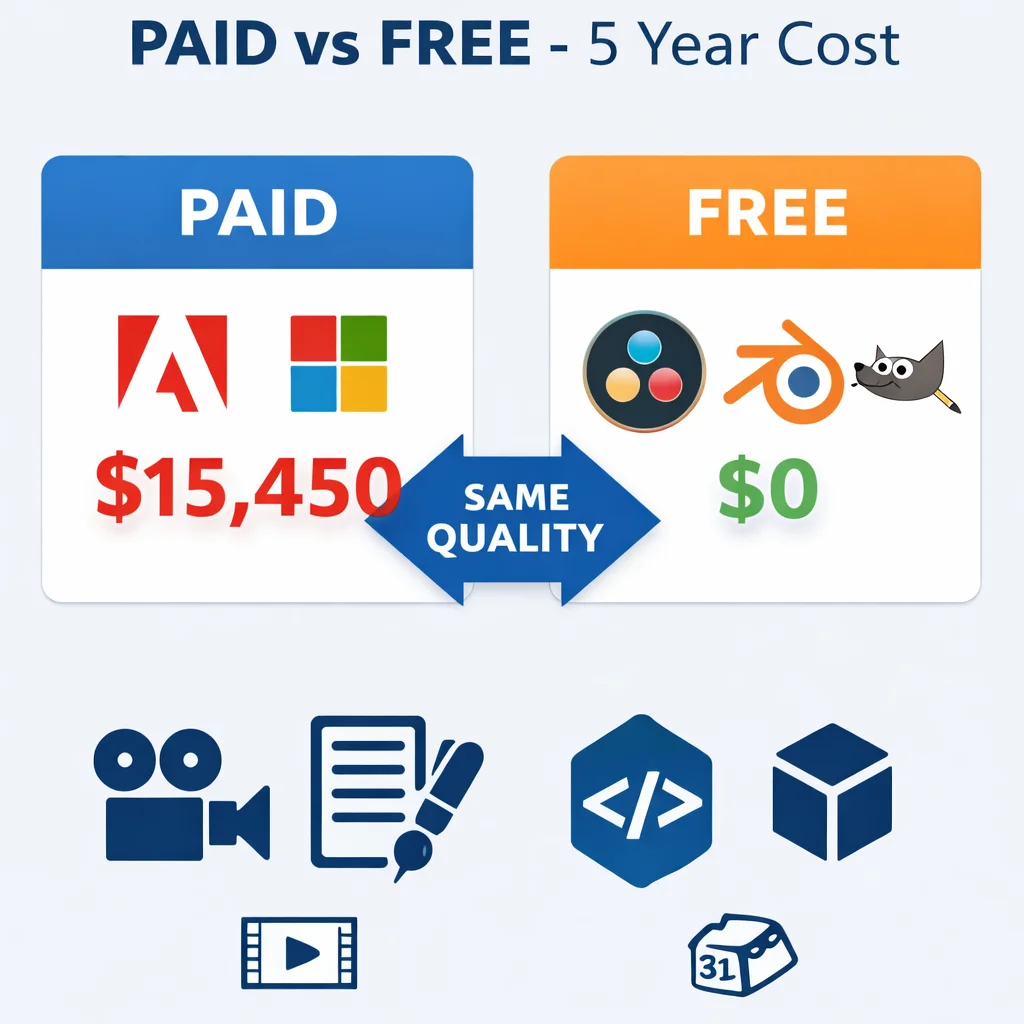
Let’s talk money. Real numbers. What you’d pay vs. what you save with Free Windows Software.Table
| Software | Commercial Price (Annual) | Free Alternative | 5-Year Savings |
|---|---|---|---|
| Adobe Creative Cloud | $600 | DaVinci Resolve + GIMP | $3,000 |
| Microsoft 365 | $70 | LibreOffice | $350 |
| Snagit/Camtasias | $280 | ShareX | $1,400 |
| AutoDesk Maya | $1,700 | Blender | $8,500 |
| Adobe Dreamweaver | $240 | VS Code | $1,200 |
| XSplit Premium | $200 | OBS Studio | $1,000 |
| TOTAL | $3,090/year | $0 | $15,450 |
That’s not pocket change. That’s a car. A down payment. A business startup fund.
And these free productivity tools aren’t trials. They’re permanent. Your license never expires. You never get locked out of your files.
Mistakes Beginners Make
I’ve watched hundreds of people try Free Windows Software. Here’s where they mess up.
Mistake #1: Downloading from wrong sites. Get software from official sources only. Fake download sites bundle viruses. Always.
Mistake #2: Expecting identical interfaces. GIMP isn’t Photoshop. LibreOffice isn’t Office. They do the same jobs differently. Adapt.
Mistake #3: Giving up too fast. These tools take 3-7 days to learn. Push through. The savings are worth it.
Mistake #4: Ignoring tutorials. YouTube has free courses for everything. Use them.
Mistake #5: Not checking system requirements. Blender needs a decent GPU. DaVinci wants 16GB RAM. Check before installing.
🔥 PRO TIP: Create a “Software Tools” folder on your D: drive. Install all free software there. When Windows inevitably needs reinstalling, your tools stay safe.
FAQ
Q: Is Free Windows Software really safe to use?
A: Absolutely—if downloaded from official sites. DaVinci Resolve from Blackmagic, LibreOffice from The Document Foundation, etc. These are legitimate companies with millions of users. Just avoid sketchy download portals.
Q: Can I use these for commercial work?
A: Yes. All listed open source software allows commercial use. I personally use them for client projects. No licensing issues. No royalty payments. Your work is yours.
Q: Do these work on Windows 11?
A: All seven tools run perfectly on Windows 11 (and Windows 10). They’re actively updated. DaVinci Resolve just got a 2026 update. VS Code updates monthly.
Q: What’s the hardest to learn?
A: Blender has the steepest curve—3D software is complex by nature. DaVinci Resolve is medium difficulty. ShareX is easiest; works immediately.
Q: Will files work with Microsoft Office or Adobe?
A: LibreOffice opens .docx and .xlsx flawlessly. GIMP opens .psd files (mostly). DaVinci Resolve imports Premiere projects. There’s compatibility, though occasionally you’ll export to universal formats like PDF or PNG.
Q: Can I get plugins/extensions?
A: Yes. VS Code has 80,000+. Blender has thousands of free add-ons. GIMP has extensive plugins. These ecosystems are massive.
Q: Why are these free?
A: Different reasons. Some are open source (community developed). Some are “freemium” (free version, paid upgrades). Some companies (like Blackmagic) sell hardware and give software away to support their cameras.
Q: Do I need a powerful computer?
A: For basic tasks? No. For DaVinci Resolve and Blender? Yes. You’ll want 16GB RAM minimum, dedicated graphics, and an SSD. For LibreOffice and ShareX? Any 5-year-old laptop works.
Q: Are there hidden fees?
A: None. No credit card required. No “accidental” subscriptions. Truly free.
Q: Which should I download first?
A: Start with LibreOffice (immediate value) and ShareX (instant utility). Add others as needed. Don’t overwhelm yourself.
Bottom Line
Free Windows Software isn’t about settling. It’s about smart choices.
You can pay $3,000/year for subscriptions. Or you can pay $0 for tools that professionals use daily. The quality is there. The support is there. The only thing missing is the bill.
I’ve used these tools for three years. Made money with them. Built skills with them. Never once felt limited by the price tag.
Start with one. Try DaVinci for video. Or LibreOffice for documents. Get comfortable. Then expand your toolkit.
The money you save? Invest it in learning. In hardware. In your future.
You don’t need expensive software to do professional work. You just need the right Free Windows Software.
Try it this week. Download one tool. Spend two hours learning it. That’s all it takes to start saving.
What’s stopping you?